Solution next error.
In your method RESTful web service add.
@GetMapping("/public/file/{url_filename:.*}")
And create next class.
import org.springframework.context.annotation.Configuration;
import org.springframework.web.servlet.config.annotation.ContentNegotiationConfigurer;
import org.springframework.web.servlet.config.annotation.CorsRegistry;
import org.springframework.web.servlet.config.annotation.EnableWebMvc;
import org.springframework.web.servlet.config.annotation.WebMvcConfigurer;
@Configuration
@EnableWebMvc
public class WebConfig implements WebMvcConfigurer {
@Override
public void configureContentNegotiation(ContentNegotiationConfigurer configurer) {
configurer.favorPathExtension(false).favorParameter(true);
}
}
Monday, April 20, 2020

Caused by: org.hibernate.AnnotationException: No identifier specified for entity
Solution next Error:
you need to add primary key in your table database and add id(@Id) annotation attribute on your class in java.
you need to add primary key in your table database and add id(@Id) annotation attribute on your class in java.
Thursday, April 16, 2020
Can't serve static html with Spring Boot 2
Solution next error.
Add next class:
package your_package;
import org.springframework.context.annotation.Configuration;
import org.springframework.web.servlet.config.annotation.ResourceHandlerRegistry;
import org.springframework.web.servlet.config.annotation.WebMvcConfigurer;
@Configuration
public class StaticResourceConfiguration implements WebMvcConfigurer {
private static final String[] CLASSPATH_RESOURCE_LOCATIONS = {
"classpath:/META-INF/resources/",
"classpath:/resources/",
"classpath:/static/",
"classpath:/public/"
};
@Override
public void addResourceHandlers(ResourceHandlerRegistry registry) {
registry.addResourceHandler("/**")
.addResourceLocations(CLASSPATH_RESOURCE_LOCATIONS);
}
}
and try again access, for example:
http:localhost:8080/your_html.html
or
http:localhost:8080/your_context/your_html.html
References:
https://spring.io/blog/2013/12/19/serving-static-web-content-with-spring-boot
Add next class:
package your_package;
import org.springframework.context.annotation.Configuration;
import org.springframework.web.servlet.config.annotation.ResourceHandlerRegistry;
import org.springframework.web.servlet.config.annotation.WebMvcConfigurer;
@Configuration
public class StaticResourceConfiguration implements WebMvcConfigurer {
private static final String[] CLASSPATH_RESOURCE_LOCATIONS = {
"classpath:/META-INF/resources/",
"classpath:/resources/",
"classpath:/static/",
"classpath:/public/"
};
@Override
public void addResourceHandlers(ResourceHandlerRegistry registry) {
registry.addResourceHandler("/**")
.addResourceLocations(CLASSPATH_RESOURCE_LOCATIONS);
}
}
and try again access, for example:
http:localhost:8080/your_html.html
or
http:localhost:8080/your_context/your_html.html
References:
https://spring.io/blog/2013/12/19/serving-static-web-content-with-spring-boot
TypeError: Cannot read property 'kind' of undefined - Angular 8
Solution next error Angular 8:
ERROR in ./node_modules/ng-multiselect-dropdown/fesm5/ng-multiselect-dropdown.js
Module build failed (from ./node_modules/@angular-devkit/build-optimizer/src/build-optimizer/webpack-loader.js):
TypeError: Cannot read property 'kind' of undefined
Change the version angular-devkit with next command:
npm install @angular-devkit/build-angular@0.803.20
check your package.json

And try again.
ng build --prod /
References:
https://github.com/ckeditor/ckeditor4-angular/issues/78
ERROR in ./node_modules/ng-multiselect-dropdown/fesm5/ng-multiselect-dropdown.js
Module build failed (from ./node_modules/@angular-devkit/build-optimizer/src/build-optimizer/webpack-loader.js):
TypeError: Cannot read property 'kind' of undefined
Change the version angular-devkit with next command:
npm install @angular-devkit/build-angular@0.803.20
check your package.json

And try again.
ng build --prod /
References:
https://github.com/ckeditor/ckeditor4-angular/issues/78
Saturday, March 28, 2020
Kotlin + OAuth2 + JWT + SpringBoot2 + JPA
I share example how to integrate Kotlin + OAuth2 + Spring Rest API + SpringBoot 2 + JWT +JPA.
Technologies used:
1. Spring Boot 2.2.6.RELEASE
2. Maven
3. OAuth2
4. Intellij IDEA Community
5. Spring Tools Suite (STS) 4
6. MySql
7. Postman
Code on GitHub:
https://github.com/HenryXiloj/Kotlin-OAuth2-SpringBoot2-JPA
Steps:
Create table on MySql:
CREATE TABLE `users`
(
`id` INT(11) NOT NULL auto_increment,
`username` VARCHAR(255) NOT NULL,
`password` VARCHAR(255) NOT NULL,
`created` TIMESTAMP NOT NULL DEFAULT CURRENT_TIMESTAMP() on
UPDATE CURRENT_TIMESTAMP(),
PRIMARY KEY (`id`)
)
I saved the password field with Security - Password Enconding (org.springframework.security.crypto.bcrypt.BCryptPasswordEncoder)
INSERT INTO users
VALUES (1,
'henry',
'$2a$04$I9Q2sDc4QGGg5WNTLmsz0.fvGv3OjoZyj81PrSFyGOqMphqfS2qKu');
IntelliJ: File -> open --> choose folder backend
Change the configuration on file application.yml

Run project from IntelliJ :
View -> Tool Windows -> Maven -> Execute Maven Goal-> mvn install

Run project backend.jar with java -jar backend.jar, in the file configuration you can define context for application, i define context --> backend and port 9000.
Credencials for test:


Test: Get token

Test: Error when you try to access ws, you need to add access_token

Add access_token -> url?access_token=your_token.

References:
https://www.devglan.com/spring-security/spring-boot-security-oauth2-example
Technologies used:
1. Spring Boot 2.2.6.RELEASE
2. Maven
3. OAuth2
4. Intellij IDEA Community
5. Spring Tools Suite (STS) 4
6. MySql
7. Postman
Code on GitHub:
https://github.com/HenryXiloj/Kotlin-OAuth2-SpringBoot2-JPA
Steps:
Create table on MySql:
CREATE TABLE `users`
(
`id` INT(11) NOT NULL auto_increment,
`username` VARCHAR(255) NOT NULL,
`password` VARCHAR(255) NOT NULL,
`created` TIMESTAMP NOT NULL DEFAULT CURRENT_TIMESTAMP() on
UPDATE CURRENT_TIMESTAMP(),
PRIMARY KEY (`id`)
)
I saved the password field with Security - Password Enconding (org.springframework.security.crypto.bcrypt.BCryptPasswordEncoder)
INSERT INTO users
VALUES (1,
'henry',
'$2a$04$I9Q2sDc4QGGg5WNTLmsz0.fvGv3OjoZyj81PrSFyGOqMphqfS2qKu');
IntelliJ: File -> open --> choose folder backend
Change the configuration on file application.yml

Run project from IntelliJ :
View -> Tool Windows -> Maven -> Execute Maven Goal-> mvn install

Run project backend.jar with java -jar backend.jar, in the file configuration you can define context for application, i define context --> backend and port 9000.
Credencials for test:


Test: Get token

Test: Error when you try to access ws, you need to add access_token
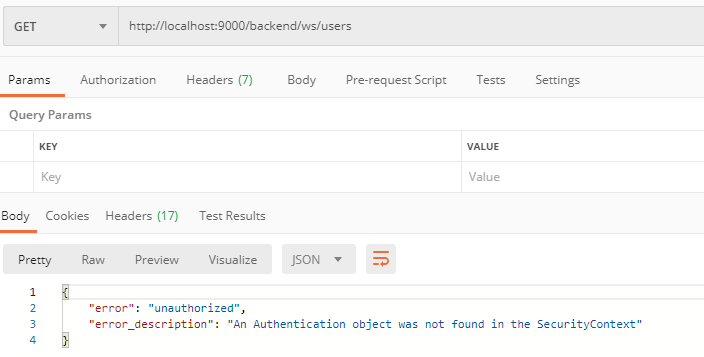
Add access_token -> url?access_token=your_token.

References:
https://www.devglan.com/spring-security/spring-boot-security-oauth2-example
Wednesday, March 25, 2020
Configure Tomcat reverseproxy https to http
If your site using https and you need to access http tomcat, you need to make reverseproxy.
Edit file conf/server.xml and add yellow paragraph:
<Connector port="8080" protocol="HTTP/1.1"
connectionTimeout="20000"
proxyName="server.company.com" scheme="https" secure="true" proxyPort="443" />
Restart tomcat.
Try again.
References:
https://serverfault.com/questions/742922/configure-tomcat-behind-reverseproxy
Edit file conf/server.xml and add yellow paragraph:
<Connector port="8080" protocol="HTTP/1.1"
connectionTimeout="20000"
proxyName="server.company.com" scheme="https" secure="true" proxyPort="443" />
Restart tomcat.
Try again.
References:
https://serverfault.com/questions/742922/configure-tomcat-behind-reverseproxy
Thursday, March 19, 2020
GIT Tips
1. Install git
sudo apt install git2. create file .ssh
sudo mkdir /home/your_user/.ssh 3. On folder .ssh run next command, (enter and enter doesn't write anything).
ssh-key4. copy content on file id_rsa.pub
cat /home/your_user/.ssh/id_rsa.pub5. Open in your browser GitHub or GitLab
GitHub: https://github.com/settings/keys -> New SSH keyGitLab:https://your_ip_or_hostname/profile/keys --> Add and SSH Key
6. Clone branch or specific branch
Any branch:
git clone <remote-repo>Specific branch:
git clone --single-branch --branch <branchname> <remote-repo>8. Discard unstaged changes
git stash9. Git Checkout Specific file
git checkout <branch_name> -- <paths>10. Override comment in commit
git commit --amend -m "My_new_comment"11. Remove local commits
git reset --hard origin/<branch_name>12. To rollback to commit
git reset --hard sha1_id13. Create GitHub Branch from Commit
Clone the Repository:
git clone https://github.com/your-username/your-repository.gitcd your-repository
Find the Commit Hash:
git logCreate a New Branch:
git checkout -b new-branch-name commit-hashPush the New Branch to GitHub:
git push origin new-branch-name14. Pull All Branches Automatically
To configure your Git repository to automatically track all remote branches, you can set the following:
git config remote.origin.fetch "+refs/heads/*:refs/remotes/origin/*"
git fetch origin
This ensures that all remote branches are fetched and mirrored locally.
15. Long path file:
git config --system core.longpaths true17. Recovery
git stash list
git stash apply stash@{0} # most recent
git stash apply stash@{6} # oldest 6 = n
Subscribe to:
Posts (Atom)
🔐AWS → Google Cloud Workload Identity Federation with Terraform
Eliminating Service Account Keys for Cross-Cloud Workloads Managing identities across cloud providers is often more challenging than manag...

-
SAML V2.0 SAML version 2.0 was approved as an OASIS Standard in March 2005. Approved Errata for SAML V2.0 was last produced by the SSTC on 1...
-
 Event‑Driven Architecture (EDA) decouples producers from consumers using an event broker. You get independent scaling, resilience, and faste...
 -
Import Changes, API Adjustments & Compatibility Results Migration summary from Spring Boot 3.5 → 4.0, including breaking changes, depend...

