Friday, March 22, 2024

Deploying a Spring Boot Application with Cloud SQL and Cloud Run on GCP

In this post, we'll explore how to provision Cloud SQL instances with different connectivity options using Terraform and then access them from a Spring Boot application deployed on Google Cloud Run. We'll leverage Terraform to create the necessary infrastructure and configure the networking components. Then, we'll build and deploy a Spring Boot application that connects to these Cloud SQL instances using the appropriate methods.


Enabled APIs

The following APIs need to be enabled for this project:

  • Cloud SQL API
  • Cloud Run API
  • Cloud Build API
  • Artifact Registry API
  • Cloud Logging API
  • Serverless VPC Access API

Terraform Project Overview

The Terraform project sets up the following resources on Google Cloud Platform (GCP):

Virtual Private Cloud (VPC) Network and Subnets: 
  • A VPC network named nw1-vpc is created, along with two subnets (nw1-vpc-sub1-us-central1 and nw1-vpc-sub3-us-west1) in different regions.

Cloud SQL Instances:

  • Public IP Instance: A Cloud SQL instance named main-instance with a public IP address is created, allowing connections from anywhere.
  • Private IP (VPC) Instance: A Cloud SQL instance named private-instance with a private IP address is created, accessible only within the VPC network.
Networking Components:

  • Firewall rules are defined to control access to the VPC network.
  • A NAT gateway is configured to allow instances in the VPC network to access the internet.
Service Account and IAM Roles: 
  • A service account named cloudsql-service-account-id is created and granted the necessary roles for accessing Cloud SQL instances.
VPC Connector: 
  • A VPC Connector named private-cloud-sql is provisioned for enabling VPC access from Google Cloud services like Cloud Run.

project structure 

terraform-project/
├── main.tf
├── network.tf
├── iam.tf
├── serviceaccount.tf
├── provider.tf
├── variables.tf
├── terraform.tfvars 

Provider Configuration

In the provider.tf file, we define the required providers and configure the Google Cloud provider with the project ID, region, and zone:

provider "google" {
  project = var.project_id
  region  = var.region
  zone    = var.zone
}

The project_id, region, and zone variables are defined in the variables.tf file and assigned values in the terraform.tfvars file.


Virtual Private Cloud (VPC) Network and Subnets

In the network.tf file, we create the VPC network and subnets:

resource "google_compute_network" "nw1-vpc" {
  project                 = var.project_id
  name                    = "nw1-vpc"
  auto_create_subnetworks = false
  mtu                     = 1460
}

resource "google_compute_subnetwork" "nw1-subnet1" {
  name                     = "nw1-vpc-sub1-${var.region}"
  network                  = google_compute_network.nw1-vpc.id
  ip_cidr_range            = "10.10.1.0/24"
  region                   = var.region
  private_ip_google_access = true
}

resource "google_compute_subnetwork" "nw1-subnet2" {
  name                     = "nw1-vpc-sub3-us-west1"
  network                  = google_compute_network.nw1-vpc.id
  ip_cidr_range            = "10.10.2.0/24"
  region                   = var.sec_region
  private_ip_google_access = true
}

Cloud SQL Instances

In the main.tf file, we create the Cloud SQL instances with different connectivity options:

  • Public IP Instance

resource "google_sql_database_instance" "my_public_instance" {
  project          = var.project_id
  name             = "main-instance"
  database_version = "POSTGRES_15"
  region           = var.region

  deletion_protection = false

  settings {
    tier = "db-f1-micro"
  }
}

  • Private IP (VPC) Instance

resource "google_sql_database_instance" "my_private_instance" {
  depends_on = [google_service_networking_connection.private_vpc_connection]

  project          = var.project_id
  name             = "private-instance"
  region           = var.region
  database_version = "POSTGRES_15"

  deletion_protection = false

  settings {
    tier = "db-f1-micro"
    ip_configuration {
      ipv4_enabled                                  = false
      private_network                               = google_compute_network.nw1-vpc.self_link
      enable_private_path_for_google_cloud_services = true
    }
  }
}

Networking Componentes

In the network.tf file, we configure various networking components:

  • Firewall Rules

resource "google_compute_firewall" "nw1-ssh-icmp-allow" {
  name    = "nw1-vpc-ssh-allow"
  network = google_compute_network.nw1-vpc.id
  allow {
    protocol = "icmp"
  }
  allow {
    protocol = "tcp"
    ports    = ["22"]
  }
  source_ranges = ["39.33.11.48/32"]
  target_tags   = ["nw1-vpc-ssh-allow"]
  priority      = 1000
}

resource "google_compute_firewall" "nw1-internal-allow" {
  name    = "nw1-vpc-internal-allow"
  network = google_compute_network.nw1-vpc.id

  allow {
    protocol = "icmp"
  }

  allow {
    protocol = "udp"
    ports    = ["0-65535"]
  }
  allow {
    protocol = "tcp"
    ports    = ["0-65535"]
  }
  source_ranges = ["10.10.0.0/16"]
  priority      = 1100
}

resource "google_compute_firewall" "nw1-iap-allow" {
  name    = "nw1-vpc-iap-allow"
  network = google_compute_network.nw1-vpc.id

  allow {
    protocol = "icmp"
  }

  allow {
    protocol = "tcp"
    ports    = ["0-65535"]
  }
  source_ranges = ["35.235.240.0/20"]
  priority      = 1200
}
  • NAT Gateway
resource "google_compute_address" "natpip" {
  name   = "ipv4-address"
  region = var.sec_region
}

resource "google_compute_router" "router1" {
  name    = "nat-router1"
  region  = var.sec_region
  network = google_compute_network.nw1-vpc.id

  bgp {
    asn = 64514
  }
}

resource "google_compute_router_nat" "nat1" {
  name                               = "natgw1"
  router                             = google_compute_router.router1.name
  region                             = var.sec_region
  nat_ip_allocate_option             = "MANUAL_ONLY"
  nat_ips                            = [google_compute_address.natpip.self_link]
  source_subnetwork_ip_ranges_to_nat = "ALL_SUBNETWORKS_ALL_IP_RANGES"
  min_ports_per_vm                   = 256
  max_ports_per_vm                   = 512

  log_config {
    enable = true
    filter = "ERRORS_ONLY"
  }
}
  • VPC Peering
resource "google_compute_global_address" "private_ip_address" {
  name          = google_compute_network.nw1-vpc.name
  purpose       = "VPC_PEERING"
  address_type  = "INTERNAL"
  prefix_length = 16
  network       = google_compute_network.nw1-vpc.name
}

resource "google_service_networking_connection" "private_vpc_connection" {
  network                 = google_compute_network.nw1-vpc.id
  service                 = "servicenetworking.googleapis.com"
  reserved_peering_ranges = [google_compute_global_address.private_ip_address.name]
}
Service Account and IAM Roles

In the serviceaccount.tf file, we create the service account and assign necessary roles:

resource "google_service_account" "cloudsql_service_account" {
  project      = var.project_id
  account_id   = "cloudsql-service-account-id"
  display_name = "Service Account for Cloud SQL"
}

resource "google_project_iam_member" "member-role" {
  depends_on = [google_service_account.cloudsql_service_account]

  for_each = toset([
    "roles/cloudsql.client",
    "roles/cloudsql.editor",
    "roles/cloudsql.admin",
    "roles/resourcemanager.projectIamAdmin",
    "roles/vpcaccess.serviceAgent"
  ])
  role    = each.key
  project = var.project_id
  member  = "serviceAccount:${google_service_account.cloudsql_service_account.email}"
}
VPC Connector
In the network.tf file, we create the VPC Connector for  access:

resource "google_vpc_access_connector" "private-cloud-sql" {
  project       = var.project_id
  name          = "private-cloud-sql"
  region        = var.region
  network       = google_compute_network.nw1-vpc.id
  machine_type  = "e2-micro"
  ip_cidr_range = "10.10.3.0/28"
}


Spring Boot Application

The Spring Boot application is designed to connect to the Cloud SQL instances provisioned by Terraform. Here are the key components:

Data Sources: 

  • Multiple data sources are configured in the application.yaml file, one for each Cloud SQL instance (public IP and private IP).

Database Configurations: 

  • Separate configuration classes (PublicIPAddresspostgresConfig and PrivateIPAddressVPCpostgresConfig) are defined to set up the database connections using the Cloud SQL Postgres Socket Factory.

Entity Models and Repositories: 

  • Entity models (Table1 and Table2) and corresponding repositories are created for interacting with the databases.

Services and Controllers: 

  • Services (Table1Service and Table2Service) and controllers (Table1Controller and Table2Controller) are implemented to handle database operations and expose REST APIs.

Dockerization: 

  • The Spring Boot application is dockerized using a Dockerfile, allowing it to be packaged and deployed as a container image.

project structure 

demo-cloudsql/
├── src/
│   ├── main/
│   │   ├── java/
│   │   │   └── com/
│   │   │       └── henry/
│   │   │           └── democloudsql/
│   │   │               ├── configuration/
│   │   │               │   ├── PrivateIPAddressVPCpostgresConfig.java
│   │   │               │   ├── PublicIPAddresspostgresConfig.java
│   │   │               ├── controller/
│   │   │               │   ├── HelloWorldController.java
│   │   │               │   ├── Table1Controller.java
│   │   │               │   ├── Table2Controller.java
│   │   │               │   
│   │   │               ├── model/
│   │   │               │   ├── privateipvpc/
│   │   │               │   │   └── Table2.java
│   │   │               │   ├── publicip/
│   │   │               │       └── Table1.java
│   │   │               ├── repository/
│   │   │               │   ├── privateipvpc/
│   │   │               │   │   └── Table2Repository.java
│   │   │               │   ├── publicip/
│   │   │               │       └── Table1Repository.java
│   │   │               ├── service/
│   │   │               │   ├── impl/
│   │   │               │   │   ├── Table1ServiceImpl.java
│   │   │               │   │   ├── Table2ServiceImpl.java
│   │   │               │   │   └
│   │   │               │   ├── Table1Service.java
│   │   │               │   ├── Table2Service.java
│   │   │               │  
│   │   │               └── DemoCloudSqlApplication.java
│   │   └── resources/
│   │       ├── application.yaml
│   │       ├── data.sql
│   │       └── schema.sql
│   └── test/
│       └── java/
│           └── com/
│               └── henry/
│                   └── democloudsql/
│                       └── DemoCloudSqlApplicationTests.java
├── Dockerfile
├── pom.xml

Data Sources Configuration

In the application.yaml file, we configure the data sources for the different Cloud SQL instances:

spring:
  datasource:
    public-ip:
      url: jdbc:postgresql:///
      database: my-database1
      cloudSqlInstance: YOUR_PROJECT_ID:us-central1:main-instance
      username: henry
      password: mypassword
      ipTypes: PUBLIC
      socketFactory: com.google.cloud.sql.postgres.SocketFactory
      driverClassName: org.postgresql.Driver
    private-ip:
      url: jdbc:postgresql:///
      database: my-database2
      cloudSqlInstance: YOUR_PROJECT_ID:us-central1:private-instance
username: henry password: mypassword ipTypes: PRIVATE socketFactory: com.google.cloud.sql.postgres.SocketFactory driverClassName: org.postgresql.Driver

Database Configuration Classes

  • PublicIPAddresspostgresConfig.java

package com.henry.democloudsql.configuration;

import com.zaxxer.hikari.HikariConfig;
import com.zaxxer.hikari.HikariDataSource;
import org.springframework.beans.factory.annotation.Value;
import org.springframework.context.annotation.Bean;
import org.springframework.context.annotation.Configuration;
import org.springframework.context.annotation.Primary;
import org.springframework.data.jpa.repository.config.EnableJpaRepositories;
import org.springframework.orm.jpa.JpaTransactionManager;
import org.springframework.orm.jpa.JpaVendorAdapter;
import org.springframework.orm.jpa.LocalContainerEntityManagerFactoryBean;
import org.springframework.orm.jpa.vendor.HibernateJpaVendorAdapter;
import org.springframework.transaction.PlatformTransactionManager;

import javax.naming.NamingException;
import javax.sql.DataSource;
import java.util.Properties;

@Configuration
@EnableJpaRepositories(
        basePackages = "com.henry.democloudsql.repository.publicip",
        entityManagerFactoryRef = "mySchemaPublicIPEntityManager",
        transactionManagerRef = "mySchemaPublicIPTransactionManager"
)
public class PublicIPAddresspostgresConfig {

    @Value("${spring.datasource.public-ip.url}")
    private  String url;
    @Value("${spring.datasource.public-ip.database}")
    private String database;
    @Value("${spring.datasource.public-ip.cloudSqlInstance}")
    private  String cloudSqlInstance;
    @Value("${spring.datasource.public-ip.username}")
    private String username;

    @Value("${spring.datasource.public-ip.password}")
    private String password;
    @Value("${spring.datasource.public-ip.ipTypes}")
    private String ipTypes;
    @Value("${spring.datasource.public-ip.socketFactory}")
    private String socketFactory;
    @Value("${spring.datasource.public-ip.driverClassName}")
    private String driverClassName;

    @Bean
    @Primary
    public LocalContainerEntityManagerFactoryBean mySchemaPublicIPEntityManager()
            throws NamingException {
        LocalContainerEntityManagerFactoryBean em
                = new LocalContainerEntityManagerFactoryBean();
        em.setDataSource(mySchemaPublicIPDataSource());
        em.setPackagesToScan("com.henry.democloudsql.model.publicip");

        JpaVendorAdapter vendorAdapter = new HibernateJpaVendorAdapter();
        em.setJpaVendorAdapter(vendorAdapter);
        em.setJpaProperties(mySchemaPublicIPHibernateProperties());

        return em;
    }

    @Bean
    @Primary
    public DataSource mySchemaPublicIPDataSource() throws IllegalArgumentException {
        HikariConfig config = new HikariConfig();

        config.setJdbcUrl(String.format(url + "%s", database));
        config.setUsername(username);
        config.setPassword(password);

        config.addDataSourceProperty("socketFactory", socketFactory);
        config.addDataSourceProperty("cloudSqlInstance", cloudSqlInstance);

        config.addDataSourceProperty("ipTypes", ipTypes);

        config.setMaximumPoolSize(5);
        config.setMinimumIdle(5);
        config.setConnectionTimeout(10000);
        config.setIdleTimeout(600000);
        config.setMaxLifetime(1800000);

        return new HikariDataSource(config);
    }

    private Properties mySchemaPublicIPHibernateProperties() {
        Properties properties = new Properties();
        return properties;
    }

    @Primary
    @Bean
    public PlatformTransactionManager mySchemaPublicIPTransactionManager() throws NamingException {
        final JpaTransactionManager transactionManager = new JpaTransactionManager();
        transactionManager.setEntityManagerFactory(mySchemaPublicIPEntityManager().getObject());
        return transactionManager;
    }
}
  • PrivateIPAddressVPCpostgresConfig.java
package com.henry.democloudsql.configuration;


import com.zaxxer.hikari.HikariConfig;
import com.zaxxer.hikari.HikariDataSource;
import org.springframework.beans.factory.annotation.Value;
import org.springframework.context.annotation.Bean;
import org.springframework.context.annotation.Configuration;
import org.springframework.data.jpa.repository.config.EnableJpaRepositories;
import org.springframework.orm.jpa.JpaTransactionManager;
import org.springframework.orm.jpa.JpaVendorAdapter;
import org.springframework.orm.jpa.LocalContainerEntityManagerFactoryBean;
import org.springframework.orm.jpa.vendor.HibernateJpaVendorAdapter;
import org.springframework.transaction.PlatformTransactionManager;

import javax.naming.NamingException;
import javax.sql.DataSource;
import java.util.Properties;

@Configuration
@EnableJpaRepositories(
        basePackages = "com.henry.democloudsql.repository.privateipvpc",
        entityManagerFactoryRef = "mySchemaVpcEntityManager",
        transactionManagerRef = "mySchemaVpcTransactionManager"
)
public class PrivateIPAddressVPCpostgresConfig {

    @Value("${spring.datasource.private-ip.url}")
    private String url;
    @Value("${spring.datasource.private-ip.database}")
    private String database;
    @Value("${spring.datasource.private-ip.cloudSqlInstance}")
    private String cloudSqlInstance;
    @Value("${spring.datasource.private-ip.username}")
    private String username;
    @Value("${spring.datasource.private-ip.password}")
    private String password;
    @Value("${spring.datasource.private-ip.ipTypes}")
    private String ipTypes;
    @Value("${spring.datasource.private-ip.socketFactory}")
    private String socketFactory;
    @Value("${spring.datasource.private-ip.driverClassName}")
    private String driverClassName;

    @Bean
    public LocalContainerEntityManagerFactoryBean mySchemaVpcEntityManager() {
        LocalContainerEntityManagerFactoryBean em
                = new LocalContainerEntityManagerFactoryBean();
        em.setDataSource(mySchemaVpcDataSource());
        em.setPackagesToScan("com.henry.democloudsql.model.privateipvpc");

        JpaVendorAdapter vendorAdapter = new HibernateJpaVendorAdapter();
        em.setJpaVendorAdapter(vendorAdapter);
        em.setJpaProperties(mySchemaVpcHibernateProperties());

        return em;
    }

    @Bean
    public DataSource mySchemaVpcDataSource() throws IllegalArgumentException {

        HikariConfig config = new HikariConfig();

        config.setJdbcUrl(String.format(url + "%s", database));
        config.setUsername(username);
        config.setPassword(password);

        config.addDataSourceProperty("socketFactory", socketFactory);
        config.addDataSourceProperty("cloudSqlInstance", cloudSqlInstance);

        config.addDataSourceProperty("ipTypes", ipTypes);

        config.setMaximumPoolSize(5);
        config.setMinimumIdle(5);
        config.setConnectionTimeout(10000);
        config.setIdleTimeout(600000);
        config.setMaxLifetime(1800000);

        return new HikariDataSource(config);

    }

    private Properties mySchemaVpcHibernateProperties() {
        Properties properties = new Properties();
        return properties;
    }
    @Bean
    public PlatformTransactionManager mySchemaVpcTransactionManager() throws NamingException {
        final JpaTransactionManager transactionManager = new JpaTransactionManager();
        transactionManager.setEntityManagerFactory(mySchemaVpcEntityManager().getObject());
        return transactionManager;
    }
}

Entity Models

package com.henry.democloudsql.model.publicip;

import jakarta.persistence.*;
import lombok.*;

@Entity
@Getter
@Setter
@NoArgsConstructor
@AllArgsConstructor
@Builder
@Table(name = "table1")
public class Table1 {

    @Id
    @GeneratedValue(strategy = GenerationType.IDENTITY)
    private Long id;

    @Column(name = "name")
    private String name;

    @Column(name = "age")
    private Integer age;
}


package com.henry.democloudsql.model.privateipvpc;

import jakarta.persistence.*;
import lombok.*;

@Entity
@Getter
@Setter
@NoArgsConstructor
@AllArgsConstructor
@Builder
@Table(name = "table2")
public class Table2 {

    @Id
    @GeneratedValue(strategy = GenerationType.IDENTITY)
    private Long id;

    @Column(name = "city")
    private String city;

    @Column(name = "country")
    private String country;
}

Repositories

public interface Table1Repository extends CrudRepository<Table1, Long> {
}
public interface Table2Repository extends CrudRepository<Table2, Long> {
}

Services

public interface Table1Service {
    Table1 save(Table1 obj);
    Iterable<Table1> findAll();
    Table1 findById(Long id);
}
@Service
public final class Table1ServiceImpl implements Table1Service {
    private final Table1Repository table1Repository;

    public Table1ServiceImpl(Table1Repository table1Repository) {
        this.table1Repository = table1Repository;
    }

    @Override
    public Table1 save(Table1 obj) {
        return null;
    }

    @Override
    public Iterable<Table1> findAll() {
        return table1Repository.findAll();
    }

    @Override
    public Table1 findById(Long id) {
        return null;
    }
}


package com.henry.democloudsql.service;


import com.henry.democloudsql.model.privateipvpc.Table2;

public interface Table2Service {

    Table2 save(Table2 obj);
    Iterable<Table2>  findAll();
    Table2 findById(Long id);
}

package com.henry.democloudsql.service.impl;

import com.henry.democloudsql.model.privateipvpc.Table2;
import com.henry.democloudsql.repository.privateipvpc.Table2Repository;
import com.henry.democloudsql.service.Table2Service;
import org.springframework.stereotype.Service;

@Service
public class Table2ServiceImpl implements Table2Service {

    private final Table2Repository table2Repository;

    public Table2ServiceImpl(Table2Repository table2Repository) {
        this.table2Repository = table2Repository;
    }

    @Override
    public Table2 save(Table2 obj) {
        return null;
    }

    @Override
    public Iterable<Table2> findAll() {
        return table2Repository.findAll();
    }

    @Override
    public Table2 findById(Long id) {
        return null;
    }
}

Controllers

package com.henry.democloudsql.controller;


import org.springframework.web.bind.annotation.GetMapping;
import org.springframework.web.bind.annotation.RestController;

import java.util.HashMap;
import java.util.Map;

@RestController
public class HelloWorldController {

    @GetMapping
    public Map<String,String> helloWorld(){
        Map<String,String> map = new HashMap<>();
        map.put("msg", "Hello Public IP Address and Private IP Address (VPC) ");
        return map;
    }
}


package com.henry.democloudsql.controller;


import com.henry.democloudsql.model.publicip.Table1;
import com.henry.democloudsql.service.Table1Service;
import org.springframework.web.bind.annotation.GetMapping;
import org.springframework.web.bind.annotation.RequestMapping;
import org.springframework.web.bind.annotation.RestController;

@RestController
@RequestMapping("/api/v1")
public class Table1Controller {

   private final Table1Service table1Service;

    public Table1Controller(Table1Service table1Service) {
        this.table1Service = table1Service;
    }

    @GetMapping
    public Iterable<Table1> findAll(){
        return table1Service.findAll();
    }
}
package com.henry.democloudsql.controller;


import com.henry.democloudsql.model.privateipvpc.Table2;
import com.henry.democloudsql.service.Table2Service;
import org.springframework.web.bind.annotation.GetMapping;
import org.springframework.web.bind.annotation.RequestMapping;
import org.springframework.web.bind.annotation.RestController;

@RestController
@RequestMapping("/api/v2")
public class Table2Controller {

    private final Table2Service table2Service;

    public Table2Controller(Table2Service table2Service) {
        this.table2Service = table2Service;
    }

    @GetMapping
    public Iterable<Table2> findAll(){
        return table2Service.findAll();
    }
}

Dockerization

The Dockerfile is used to build the Docker image for the Spring Boot application:

FROM openjdk:17-jdk-slim
WORKDIR /app
COPY target/demo-cloudsql.jar app.jar
ENTRYPOINT ["java", "-jar", "app.jar"]

This Dockerfile uses the openjdk:17-jdk-slim base image, sets the working directory to /app, copies the built Spring Boot JAR file (demo-cloudsql.jar) into the container, and specifies the entrypoint to run the JAR file.

Additional Details

  • Executing Terraform Commands: 

Before deploying the Spring Boot application, run the following Terraform commands to provision the infrastructure:

terraform init

terraform validate

terraform apply -auto-approve

  • Building and Deploying Spring Boot Application: 

After modifying MY_PROJECT_ID in application.yml on Spring Boot App, run:

mvn clean install

After clean install, you can build the Docker image locally using the following command:

docker build -t quickstart-springboot:1.0.1 .

This command builds the Docker image with the tag quickstart-springboot:1.0.1 using the Dockerfile in the current directory.


Deployment and Integration

  • Create an Artifact Repository
Follow the provided instructions to create an Artifact Repository in Google Artifact Registry using the gcloud command:

gcloud artifacts repositories create my-repo --location us-central1 --repository-format docker

This command creates a Docker repository named my-repo in the us-central1 region.

  • Push Docker Image to Artifact Registry
To push the Docker image to the Artifact Registry, you first need to tag it with the appropriate URL:

docker tag quickstart-springboot:1.0.1 us-central1-docker.pkg.dev/MY_PROJECT_ID/my-repo/quickstart-springboot:1.0.1

Replace MY_PROJECT_ID with your actual GCP project ID.

Then, push the tagged image to the Artifact Registry:

docker push us-central1-docker.pkg.dev/MY_PROJECT_ID/my-repo/quickstart-springboot:1.0.1

Deploy to Cloud Run

Deploy the Spring Boot application to Google Cloud Run using the gcloud command:

gcloud run deploy springboot-cloudsql-run \
  --image us-central1-docker.pkg.dev/<PROJECT_ID>/my-repo/quickstart-springboot:1.0.1 \
  --region=us-central1 \
  --allow-unauthenticated \
  --service-account=cloudsql-service-account-id@<PROJECT-ID>.iam.gserviceaccount.com \
  --vpc-connector private-cloud-sql

Replace MY_PROJECT_ID with your actual GCP project ID, and springboot-cloudsql-run with the desired name for your Cloud Run service.

This command deploys the Spring Boot application to Cloud Run, using the Docker image from the Artifact Registry. It also specifies the service account created by Terraform (cloudsql-service-account-id@<PROJECT-ID>.iam.gserviceaccount.com) and the VPC Connector (private-cloud-sql) for  access.

After executing this command, your Spring Boot application should be deployed and accessible on Cloud Run, with the ability to connect to the provisioned Cloud SQL instances using the appropriate connectivity methods (public IP and private IP).


Test
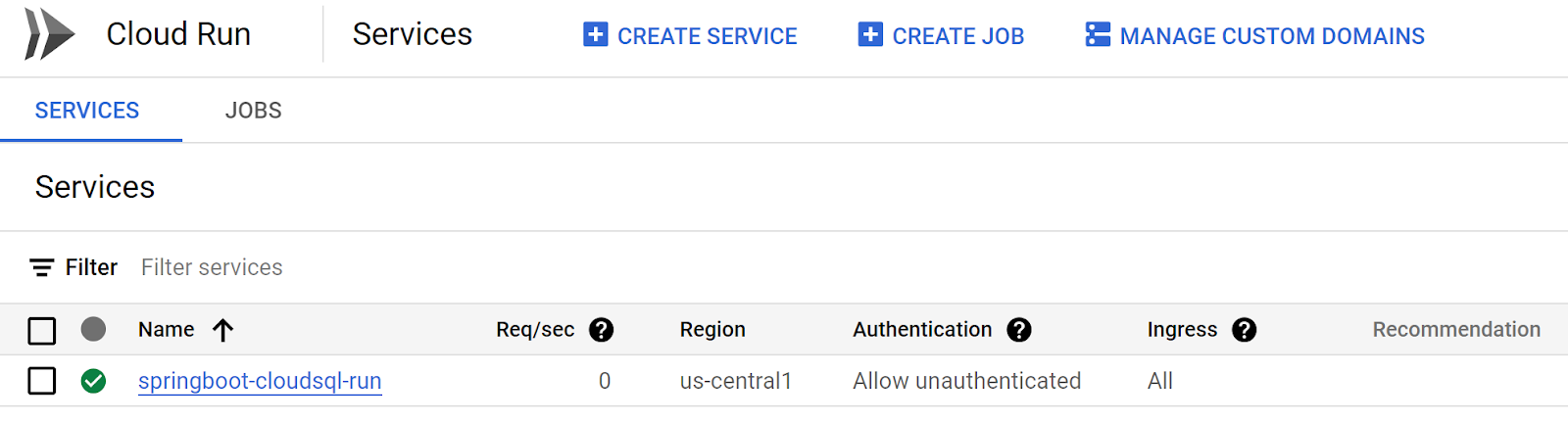


Hello: https://springboot-cloudsql-run-bfzyqsbe2a-uc.a.run.app/


Public IP DB: https://springboot-cloudsql-run-bfzyqsbe2a-uc.a.run.app/api/v1


VPC DB: https://springboot-cloudsql-run-bfzyqsbe2a-uc.a.run.app/api/v2


Source Code


References


https://www.linkedin.com/pulse/cloud-sql-private-ip-auth-proxy-using-terraform-iaac-google-chandio/
https://xebia.com/blog/how-to-create-a-private-serverless-connection-with-cloudsql/
https://cloud.google.com/sql/docs/mysql/connect-overview
https://github.com/GoogleCloudPlatform/cloud-sql-jdbc-socket-factory
https://github.com/GoogleCloudPlatform/cloud-sql-jdbc-socket-factory/blob/main/docs/jdbc.md


Tuesday, December 19, 2023

Multiple Data Sources in Spring Boot 3 with Java 21


In this blog post, we'll explore the configuration and setup for a Spring Boot 3 application with Java 21 that uses multiple data sources. This setup is useful when dealing with databases of different types, such as MySQL, Oracle, and PostgreSQL. 


Technology


  • Spring Boot 3.2.0
  • Java 21 (Zulu)
  • Docker Compose
  • Maven 
  • IntelliJ IDEA  2023.3.1 Community 
  • Postman


Project Structure


multiple-data-sources-jpa
|-- src
|   |-- main
|       |-- java
|           |-- com
|               |-- henry
|                   |-- configuration
|                   |-- model
|                   |-- repository
|                   |-- service
|                   |-- controller
|-- src
|   |-- test
|       |-- java
|           |-- com
|               |-- henry
|                   |-- ...
|-- pom.xml


Application.yaml Configuration


The application file contains configuration deatils for each data source, including URLs, usernames, passowrds, and driver class names.


server:
  port: 9000
  servlet:
    context-path: /

spring:
  datasource:
    mysql:
      url: jdbc:mysql://localhost:3306/test_db?allowPublicKeyRetrieval=true
      username: test
      password: test_pass
      driverClassName: com.mysql.cj.jdbc.Driver
      ddlAuto: create-drop
    postgres:
      url: jdbc:postgresql:postgre_test
      username: postgre_test
      password: postgre_test
      driverClassName: org.postgresql.Driver
      ddlAuto: create-drop
    oracle:
      url: jdbc:oracle:thin:@//localhost:1521/xe
      username: system
      password: oracle
      driverClassName: oracle.jdbc.OracleDriver
      ddlAuto: update


Configuration Classes


We've created configuration classes for each data source - MysqlConfig, PostgreConfig, and OracleConfig:


package com.henry.configuration;

import com.henry.record.OracleRecord;
import com.henry.record.PostgreRecord;
import com.henry.record.MysqlRecord;
import org.springframework.boot.context.properties.ConfigurationProperties;
import org.springframework.stereotype.Component;

import lombok.Data;

@Component
@ConfigurationProperties("spring.datasource")
@Data
public class DataSourceProperties {
   private MysqlRecord mysql;
   private PostgreRecord postgres;
   private OracleRecord oracle;

}


package com.henry.configuration;

import org.springframework.beans.factory.annotation.Autowired;
import org.springframework.context.annotation.Bean;
import org.springframework.context.annotation.Configuration;
import org.springframework.context.annotation.Primary;
import org.springframework.data.jpa.repository.config.EnableJpaRepositories;
import org.springframework.jdbc.datasource.DriverManagerDataSource;
import org.springframework.orm.jpa.JpaTransactionManager;
import org.springframework.orm.jpa.JpaVendorAdapter;
import org.springframework.orm.jpa.LocalContainerEntityManagerFactoryBean;
import org.springframework.orm.jpa.vendor.HibernateJpaVendorAdapter;
import org.springframework.transaction.PlatformTransactionManager;

import javax.naming.NamingException;
import javax.sql.DataSource;
import java.util.Properties;

@Configuration
@EnableJpaRepositories(
        basePackages = "com.henry.repository.user",
        entityManagerFactoryRef = "userEntityManager",
        transactionManagerRef = "userTransactionManager"
)
public class MysqlConfig {

    @Autowired
    private DataSourceProperties dsProperties;

    @Bean
    @Primary
    public LocalContainerEntityManagerFactoryBean userEntityManager()
            throws NamingException {
        LocalContainerEntityManagerFactoryBean em
                = new LocalContainerEntityManagerFactoryBean();
        em.setDataSource(userDataSource());
        em.setPackagesToScan("com.henry.model.user");

        JpaVendorAdapter vendorAdapter = new HibernateJpaVendorAdapter();
        em.setJpaVendorAdapter(vendorAdapter);
        em.setJpaProperties(userHibernateProperties());

        return em;
    }

    @Bean
    @Primary
    public DataSource userDataSource() throws IllegalArgumentException, NamingException {
        DriverManagerDataSource dataSource = new DriverManagerDataSource();
        dataSource.setDriverClassName(dsProperties.getMysql().driverClassName());
        dataSource.setUrl(dsProperties.getMysql().url());
        dataSource.setUsername(dsProperties.getMysql().username());
        dataSource.setPassword(dsProperties.getMysql().password());

        return dataSource;
    }

    private Properties userHibernateProperties() {
        Properties properties = new Properties();
        properties.put("hibernate.hbm2ddl.auto",dsProperties.getMysql().ddlAuto());

        return properties;
    }

    @Primary
    @Bean
    public PlatformTransactionManager userTransactionManager() throws NamingException {
        final JpaTransactionManager transactionManager = new JpaTransactionManager();
        transactionManager.setEntityManagerFactory(userEntityManager().getObject());
        return transactionManager;
    }
}

package com.henry.configuration;

import org.springframework.beans.factory.annotation.Autowired;
import org.springframework.context.annotation.Bean;
import org.springframework.context.annotation.Configuration;
import org.springframework.data.jpa.repository.config.EnableJpaRepositories;
import org.springframework.jdbc.datasource.DriverManagerDataSource;
import org.springframework.orm.jpa.JpaTransactionManager;
import org.springframework.orm.jpa.JpaVendorAdapter;
import org.springframework.orm.jpa.LocalContainerEntityManagerFactoryBean;
import org.springframework.orm.jpa.vendor.HibernateJpaVendorAdapter;
import org.springframework.transaction.PlatformTransactionManager;

import javax.naming.NamingException;
import javax.sql.DataSource;
import java.util.Properties;

@Configuration
@EnableJpaRepositories(
        basePackages = "com.henry.repository.brand",
        entityManagerFactoryRef = "brandEntityManager",
        transactionManagerRef = "brandTransactionManager"
)
public class OracleConfig {

    @Autowired
    private DataSourceProperties dsProperties;

    @Bean
    public LocalContainerEntityManagerFactoryBean brandEntityManager()
            throws NamingException {
        LocalContainerEntityManagerFactoryBean em
                = new LocalContainerEntityManagerFactoryBean();
        em.setDataSource(brandDataSource());
        em.setPackagesToScan("com.henry.model.brand");

        JpaVendorAdapter vendorAdapter = new HibernateJpaVendorAdapter();
        em.setJpaVendorAdapter(vendorAdapter);
        em.setJpaProperties(brandHibernateProperties());

        return em;
    }

    @Bean
    public DataSource brandDataSource() throws IllegalArgumentException, NamingException {
        DriverManagerDataSource dataSource = new DriverManagerDataSource();
        dataSource.setDriverClassName(dsProperties.getOracle().driverClassName());
        dataSource.setUrl(dsProperties.getOracle().url());
        dataSource.setUsername(dsProperties.getOracle().username());
        dataSource.setPassword(dsProperties.getOracle().password());

        return dataSource;
    }

    private Properties brandHibernateProperties() {
        Properties properties = new Properties();
        properties.put("hibernate.hbm2ddl.auto", dsProperties.getOracle().ddlAuto());

        return properties;
    }


    @Bean
    public PlatformTransactionManager brandTransactionManager() throws NamingException {
        final JpaTransactionManager transactionManager = new JpaTransactionManager();
        transactionManager.setEntityManagerFactory(brandEntityManager().getObject());
        return transactionManager;
    }
}

package com.henry.configuration;

import org.springframework.beans.factory.annotation.Autowired;
import org.springframework.context.annotation.Bean;
import org.springframework.context.annotation.Configuration;
import org.springframework.data.jpa.repository.config.EnableJpaRepositories;
import org.springframework.jdbc.datasource.DriverManagerDataSource;
import org.springframework.orm.jpa.JpaTransactionManager;
import org.springframework.orm.jpa.JpaVendorAdapter;
import org.springframework.orm.jpa.LocalContainerEntityManagerFactoryBean;
import org.springframework.orm.jpa.vendor.HibernateJpaVendorAdapter;
import org.springframework.transaction.PlatformTransactionManager;

import javax.naming.NamingException;
import javax.sql.DataSource;
import java.util.Properties;

@Configuration
@EnableJpaRepositories(
        basePackages = "com.henry.repository.company",
        entityManagerFactoryRef = "companyEntityManager",
        transactionManagerRef = "companyTransactionManager"
)
public class PostgreConfig {

    @Autowired
    private DataSourceProperties dsProperties;

    @Bean
    public LocalContainerEntityManagerFactoryBean companyEntityManager()
            throws NamingException {
        LocalContainerEntityManagerFactoryBean em
                = new LocalContainerEntityManagerFactoryBean();
        em.setDataSource(companyDataSource());
        em.setPackagesToScan("com.henry.model.company");

        JpaVendorAdapter vendorAdapter = new HibernateJpaVendorAdapter();
        em.setJpaVendorAdapter(vendorAdapter);
        em.setJpaProperties(companyHibernateProperties());

        return em;
    }

    @Bean
    public DataSource companyDataSource() throws IllegalArgumentException, NamingException {
        DriverManagerDataSource dataSource = new DriverManagerDataSource();
        dataSource.setDriverClassName(dsProperties.getPostgres().driverClassName());
        dataSource.setUrl(dsProperties.getPostgres().url());
        dataSource.setUsername(dsProperties.getPostgres().username());
        dataSource.setPassword(dsProperties.getPostgres().password());

        return dataSource;
    }

    private Properties companyHibernateProperties() {
        Properties properties = new Properties();
        properties.put("hibernate.hbm2ddl.auto", dsProperties.getPostgres().ddlAuto());

        return properties;
    }

    @Bean
    public PlatformTransactionManager companyTransactionManager() throws NamingException {
        final JpaTransactionManager transactionManager = new JpaTransactionManager();
        transactionManager.setEntityManagerFactory(companyEntityManager().getObject());
        return transactionManager;
    }
}


Record Classes


To encapsulate the configuration properties for each data source, we've defined record classes - MysqlRecord, PostgreRecord, and OracleRecord:


package com.henry.record;

public record MysqlRecord(String url, String username, String password, String driverClassName,String ddlAuto) {
}

package com.henry.record;

public record OracleRecord(String url, String username, String password, String driverClassName,String ddlAuto) {
}


package com.henry.record;

public record PostgreRecord(String url, String username, String password, String driverClassName,String ddlAuto) {
}

Repositories


Repository interfaces extend the CrudRepository for each entity (Brand, Company, User):


package com.henry.repository.brand;

import com.henry.model.brand.Brand;
import org.springframework.data.repository.CrudRepository;

public interface BrandRepository extends CrudRepository<Brand,Long> {
}

package com.henry.repository.company;

import com.henry.model.company.Company;
import org.springframework.data.repository.CrudRepository;

public interface CompanyRepository extends CrudRepository<Company,Long> {
}

package com.henry.repository.user;

import com.henry.model.user.User;
import org.springframework.data.repository.CrudRepository;

public interface UserRepository extends CrudRepository<User,Long> {
}

Services


Service classes (BrandServiceImpl, CompanyServiceImpl, UserServiceImpl) implement a common interface (DefaultService) for generic CRUD operations:

package com.henry.service;

public sealed interface DefaultService<T, G> permits UserServiceImpl, CompanyServiceImpl, BrandServiceImpl {

    T save(T obj);
    Iterable<T>  findAll();
    T findById(G id);
}

package com.henry.service;

import com.henry.model.brand.Brand;
import com.henry.repository.brand.BrandRepository;
import org.springframework.stereotype.Service;

@Service
public final class BrandServiceImpl implements DefaultService<Brand, Long> {

    private final BrandRepository brandRepository;

    public BrandServiceImpl(BrandRepository brandRepository) {
        this.brandRepository = brandRepository;
    }


    @Override
    public Brand save(Brand obj) {
        return brandRepository.save(obj);
    }

    @Override
    public Iterable<Brand> findAll() {
        return brandRepository.findAll();
    }

    @Override
    public Brand findById(Long id) {
        return brandRepository.findById(id).get();
    }
}

package com.henry.service;

import com.henry.model.company.Company;
import com.henry.repository.company.CompanyRepository;
import org.springframework.stereotype.Service;

@Service
public final class CompanyServiceImpl implements DefaultService<Company, Long> {

    private final CompanyRepository companyRepository;

    public CompanyServiceImpl(CompanyRepository companyRepository) {
        this.companyRepository = companyRepository;
    }

    @Override
    public Company save(Company obj) {
        return companyRepository.save(obj);
    }

    @Override
    public Iterable<Company> findAll() {
        return companyRepository.findAll();
    }

    @Override
    public Company findById(Long id) {
        return companyRepository.findById(id).get();
    }
}

package com.henry.service;

import com.henry.model.user.User;
import com.henry.repository.user.UserRepository;
import org.springframework.stereotype.Service;

@Service
public final class UserServiceImpl implements DefaultService<User,Long> {

    private final UserRepository userRepository;

    public UserServiceImpl(UserRepository userRepository) {
        this.userRepository = userRepository;
    }

    @Override
    public User save(User obj) {
        return userRepository.save(obj);
    }

    @Override
    public Iterable<User> findAll() {
        return userRepository.findAll();
    }

    @Override
    public User findById(Long id) {
        return userRepository.findById(id).get();
    }
}

REST Controllers


REST controllers (BrandController, CompanyController, UserController) handle HTTP requests for creating entities:


package com.henry.controller;

import com.henry.model.brand.Brand;
import com.henry.service.DefaultService;
import org.springframework.web.bind.annotation.PostMapping;
import org.springframework.web.bind.annotation.RequestBody;
import org.springframework.web.bind.annotation.RequestMapping;
import org.springframework.web.bind.annotation.RestController;

@RestController
@RequestMapping("/api/v3")
public class BrandController {

    private final DefaultService<Brand, Long> defaultService;

    public BrandController(DefaultService<Brand, Long> defaultService) {
        this.defaultService = defaultService;
    }

    @PostMapping("/brands")
    public Brand createEmployee(@RequestBody Brand brand) {
        return defaultService.save(brand);
    }

}

package com.henry.controller;

import com.henry.model.company.Company;
import com.henry.service.DefaultService;
import org.springframework.web.bind.annotation.PostMapping;
import org.springframework.web.bind.annotation.RequestBody;
import org.springframework.web.bind.annotation.RequestMapping;
import org.springframework.web.bind.annotation.RestController;

@RestController
@RequestMapping("/api/v2")
public class CompanyController {

    private final DefaultService<Company,Long> defaultService;

    public CompanyController(DefaultService<Company, Long> defaultService) {
        this.defaultService = defaultService;
    }

    @PostMapping("/companies")
    public Company createEmployee(@RequestBody Company company) {
        return defaultService.save(company);
    }
}

package com.henry.controller;

import com.henry.model.user.User;
import com.henry.service.DefaultService;
import org.springframework.web.bind.annotation.PostMapping;
import org.springframework.web.bind.annotation.RequestBody;
import org.springframework.web.bind.annotation.RequestMapping;
import org.springframework.web.bind.annotation.RestController;

@RestController
@RequestMapping("/api/v1")
public class UserController {

    private final DefaultService<User,Long> defaultService;

    public UserController(DefaultService<User, Long> defaultService) {
        this.defaultService = defaultService;
    }

    @PostMapping("/users")
    public User createEmployee(@RequestBody User user) {
        return defaultService.save(user);
    }
}


Test Classes


JUnit test classes (BrandServiceTest, CompanyServiceTest, UserServiceTest) use Mockito for mocking dependencies:


package com.henry;

import com.google.common.collect.Iterables;
import com.henry.model.brand.Brand;
import com.henry.repository.brand.BrandRepository;
import com.henry.service.BrandServiceImpl;
import org.junit.jupiter.api.Test;
import org.junit.jupiter.api.extension.ExtendWith;
import org.mockito.InjectMocks;
import org.mockito.Mock;
import org.mockito.junit.jupiter.MockitoExtension;

import java.util.Arrays;
import java.util.Optional;

import static org.junit.jupiter.api.Assertions.assertEquals;
import static org.mockito.ArgumentMatchers.any;
import static org.mockito.Mockito.verify;
import static org.mockito.Mockito.when;

@ExtendWith(MockitoExtension.class)
class BrandServiceTest {

    @Mock
    private BrandRepository brandRepository;

    @InjectMocks
    private BrandServiceImpl brandService;

    @Test
    void testSaveBrand() {
        Brand brand = Brand.builder()
                .id(1L)
                .name("Test Brand")
                .build();

        when(brandRepository.save(any())).thenReturn(brand);

        Brand saved = brandService.save(brand);

        assertEquals(brand, saved);
        verify(brandRepository).save(any());
    }

    @Test
    void testFindAllBrands() {
        Brand brand1 = Brand.builder()
                .id(1L)
                .name("Test Brand")
                .build();
        Brand brand2 = Brand.builder()
                .id(2L)
                .name("Demo Brand")
                .build();

        when(brandRepository.findAll()).thenReturn(Arrays.asList(brand1, brand2));

        Iterable<Brand> result = brandService.findAll();

        assertEquals(2, Iterables.size(result));
        verify(brandRepository).findAll();
    }

    @Test
    void testFindBrandById() {
        Brand brand = Brand.builder()
                .id(1L)
                .name("Demo Brand")
                .build();

        when(brandRepository.findById(1L)).thenReturn(Optional.of(brand));

        Brand result = brandService.findById(1L);

        assertEquals(brand, result);
        verify(brandRepository).findById(1L);
    }
}
package com.henry;

import com.google.common.collect.Iterables;
import com.henry.model.company.Company;
import com.henry.repository.company.CompanyRepository;
import com.henry.service.CompanyServiceImpl;
import org.junit.jupiter.api.Test;
import org.junit.jupiter.api.extension.ExtendWith;
import org.mockito.InjectMocks;
import org.mockito.Mock;
import org.mockito.junit.jupiter.MockitoExtension;

import java.util.Arrays;
import java.util.Optional;

import static org.junit.jupiter.api.Assertions.assertEquals;
import static org.mockito.ArgumentMatchers.any;
import static org.mockito.Mockito.verify;
import static org.mockito.Mockito.when;

@ExtendWith(MockitoExtension.class)
class CompanyServiceTest {

    @Mock
    private CompanyRepository companyRepository;

    @InjectMocks
    private CompanyServiceImpl companyService;

    @Test
    void testSaveCompany() {
        Company company =
                Company.builder()
                        .id(1L)
                        .name("Test Corp")
                        .build();

        when(companyRepository.save(any())).thenReturn(company);

        Company saved = companyService.save(company);

        assertEquals(company, saved);
        verify(companyRepository).save(any());
    }

    @Test
    void testFindAllCompanies() {
        Company comp1 = Company.builder()
                .id(1L)
                .name("Test Corp")
                .build();
        Company comp2 = Company.builder()
                .id(2L)
                .name("Demo Corp")
                .build();

        when(companyRepository.findAll()).thenReturn(Arrays.asList(comp1, comp2));

        Iterable<Company> result = companyService.findAll();


        assertEquals(2, Iterables.size(result));
        verify(companyRepository).findAll();
    }

    @Test
    void testFindCompanyById() {
        Company company = Company.builder()
                .id(1L)
                .name("Test Corp")
                .build();

        when(companyRepository.findById(1L)).thenReturn(Optional.of(company));

        Company result = companyService.findById(1L);

        assertEquals(company, result);
        verify(companyRepository).findById(1L);
    }
}
package com.henry;

import com.google.common.collect.Iterables;
import com.henry.model.user.User;
import com.henry.repository.user.UserRepository;
import com.henry.service.UserServiceImpl;
import org.junit.jupiter.api.Test;
import org.junit.jupiter.api.extension.ExtendWith;
import org.mockito.InjectMocks;
import org.mockito.Mock;
import org.mockito.junit.jupiter.MockitoExtension;

import java.util.Arrays;
import java.util.Optional;

import static org.junit.jupiter.api.Assertions.assertEquals;
import static org.mockito.ArgumentMatchers.any;
import static org.mockito.Mockito.verify;
import static org.mockito.Mockito.when;

@ExtendWith(MockitoExtension.class)
public class UserServiceTest {

    @Mock
    private UserRepository userRepository;

    @InjectMocks
    private UserServiceImpl userService;

    @Test
    public void saveUser_shouldPersistUser() {
/**

 int x = 10;
 int y = 20;
 String result = STR."\{x} + \{y} = \{x + y}";
 string templates are a preview feature and are disabled by default.
 Are string templates supported yet? - IntelliJ support - JetBrains
 https://intellij-support.jetbrains.com/hc/en-us/community/posts/13451540436114-Are-string-templates-supported-yet-
 **/

        // Create a User
        User user = User.builder()
                .id(1L)
                .name("John")
                .lastName("Doe")
                .build();

        when(userRepository.save(any())).thenReturn(user);

        User saved = userService.save(user);

        assertEquals(user, saved);
        verify(userRepository).save(any());
    }

    @Test
    void testFindAllUsers() {
        User user1 = User.builder()
                .id(1L)
                .name("John")
                .lastName("Doe")
                .build();
        User user2 = User.builder()
                .id(2L)
                .name("John")
                .lastName("Doe")
                .build();

        when(userRepository.findAll()).thenReturn(Arrays.asList(user1, user2));

        Iterable<User> result = userService.findAll();

        assertEquals(2, Iterables.size(result));
        verify(userRepository).findAll();
    }

    @Test
    void testFindUserById() {
        User user = User.builder()
                .id(1L)
                .name("John")
                .lastName("Doe")
                .build();

        when(userRepository.findById(1L)).thenReturn(Optional.of(user));

        User result = userService.findById(1L);

        assertEquals(user, result);
        verify(userRepository).findById(1L);
    }
}


Maven Configuration


The pom.xml file manages project dependencies and build configuration:


<?xml version="1.0" encoding="UTF-8"?>
<project xmlns="http://maven.apache.org/POM/4.0.0" xmlns:xsi="http://www.w3.org/2001/XMLSchema-instance"
	xsi:schemaLocation="http://maven.apache.org/POM/4.0.0 https://maven.apache.org/xsd/maven-4.0.0.xsd">
	<modelVersion>4.0.0</modelVersion>
	<parent>
		<groupId>org.springframework.boot</groupId>
		<artifactId>spring-boot-starter-parent</artifactId>
		<version>3.2.0</version>
		<relativePath/> <!-- lookup parent from repository -->
	</parent>
	<groupId>com.henry</groupId>
	<artifactId>multiple-data-sources-jpa</artifactId>
	<version>0.0.1-SNAPSHOT</version>
	<name>multiple-data-sources-jpa</name>
	<description>Demo project multiple data sources jpa</description>
	<properties>
		<java.version>21</java.version>
	</properties>
	<dependencies>

		<dependency>
			<groupId>org.springframework.boot</groupId>
			<artifactId>spring-boot-starter-web</artifactId>
			<exclusions>
				<!-- Exclude the Tomcat dependency -->
				<exclusion>
					<groupId>org.springframework.boot</groupId>
					<artifactId>spring-boot-starter-tomcat</artifactId>
				</exclusion>
			</exclusions>
		</dependency>
		<!-- Use Jetty instead -->
		<dependency>
			<groupId>org.springframework.boot</groupId>
			<artifactId>spring-boot-starter-jetty</artifactId>
		</dependency>

		<dependency>
			<groupId>org.springframework.boot</groupId>
			<artifactId>spring-boot-starter-data-jpa</artifactId>
		</dependency>

		<!-- MARIADB Connector -->

		<dependency>
			<groupId>org.mariadb.jdbc</groupId>
			<artifactId>mariadb-java-client</artifactId>
		</dependency>

		<!-- Mysql Connector -->
		<dependency>
			<groupId>mysql</groupId>
			<artifactId>mysql-connector-java</artifactId>
			<version>8.0.30</version>
		</dependency>

		<!-- ORACLE database driver -->
		<!-- https://mvnrepository.com/artifact/oracle/ojdbc6 -->
		<dependency>
			<groupId>com.oracle</groupId>
			<artifactId>ojdbc6</artifactId>
			<version>11.2.0.4</version>
		</dependency>

		<!-- POSTGRESQL database driver -->
		<dependency>
			<groupId>org.postgresql</groupId>
			<artifactId>postgresql</artifactId>
			<scope>runtime</scope>
		</dependency>

		<dependency>
			<groupId>com.google.guava</groupId>
			<artifactId>guava</artifactId>
			<version>31.0.1-jre</version>
		</dependency>

		<!-- https://mvnrepository.com/artifact/org.antlr/stringtemplate
		<dependency>
			<groupId>org.antlr</groupId>
			<artifactId>stringtemplate</artifactId>
			<version>4.0.2</version>
		</dependency>
		-->

		<dependency>
			<groupId>org.springframework.boot</groupId>
			<artifactId>spring-boot-starter-test</artifactId>
			<scope>test</scope>
		</dependency>
		<dependency>
			<groupId>org.projectlombok</groupId>
			<artifactId>lombok</artifactId>
		</dependency>
		<dependency>
			<groupId>junit</groupId>
			<artifactId>junit</artifactId>
			<scope>test</scope>
		</dependency>
	</dependencies>

	<build>
		<plugins>
			<plugin>
				<groupId>org.springframework.boot</groupId>
				<artifactId>spring-boot-maven-plugin</artifactId>
			</plugin>
			<plugin>
				<groupId>org.apache.maven.plugins</groupId>
				<artifactId>maven-compiler-plugin</artifactId>
				<configuration>
					<source>21</source>
					<target>21</target>
					<compilerArgs>--enable-preview</compilerArgs>
				</configuration>
			</plugin>
		</plugins>
	</build>

</project>


Environment Setup with Docker Compose


To simplify the setup of your application's environment, you can use Docker Compose. Below is a docker-compose-multiple-db.yml file that defines services for Oracle, PostgreSQL, and MySQL databases:

version: '3'
services:
  oracle:
    image: pengbai/docker-oracle-xe-11g-r2
    ports:
      - "1521:1521"
      - "8080:8080"
    shm_size: 1g

  postgres:
    image: postgres:14.1
    container_name: postgre_test
    environment:
      POSTGRES_USER: postgre_test
      POSTGRES_PASSWORD: postgre_test
      POSTGRES_DB: postgre_test
    ports:
      - "5432:5432"

  mysql:
    image: mysql/mysql-server:latest
    container_name: mysql-docker-container
    environment:
      MYSQL_ROOT_PASSWORD: mypass
      MYSQL_DATABASE: test_db
      MYSQL_USER: test
      MYSQL_PASSWORD: test_pass
    ports:
      - "3306:3306"

Run command:

 
docker-compose -f docker-compose-multiple-db.yml up -d


Only for oracle:

mvn install:install-file "-Dfile=path/to/your/ojdbc6.jar" "-DgroupId=com.oracle" "-DartifactId=ojdbc6" "-Dversion=11.2.0.4" "-Dpackaging=jar" "-DgeneratePom=true"


Run & Test


Run Spring Boot application with command: by console, IntelliJ etc.


mvn test -Dtest=UserServiceTest

mvn test -Dtest=BrandServiceTest

mvn test -Dtest=CompanyServiceTest


Run locally: mvn spring-boot:run


POST
http://localhost:9000/api/v1/users

{
    "name""henry",
    "lastName""x"
}


POST
http://localhost:9000/api/v2/companies
{
    "name""company1"
}


POST
http://localhost:9000/api/v3/brands

{
    "name""Demo Brand"
}


Source Code


Here on GitHub.


Notes: 


Possible issues:
  • Lombok Plugin check if it was installed in IntelliJ 
  • Others issues please -> File | Invalidate Caches
  • Change the port if you have in local databases. Otherwise you have conflicts.


🚀 Spring Boot 3.5 → 4.0.3 Migration Summary

Import Changes, API Adjustments & Compatibility Results Migration summary from Spring Boot 3.5 → 4.0, including breaking changes, depend...